Firewall Roundup - Leak-tests Results
2007-12-13
I found a site that does Leak-tests and posts the results of popular firewalls. You can find the chart here. A summary follows:
As we've discussed previously, my favorite kind of software is the kind that's free. It was no surprise to me that my favorite firewall (though it may get replaced soon by the, also free, number one on the list) is near the top of this list at number 3. Below is the top 10. It should be noted that these are NOT ALL FREE, but the ones that are have notes to let you know that. To see the whole list, view their Leak-tests Results here. I'll post on my thoughts on firewall's in the near future, but first I just may end up trying my hand at another free one.
Freeware Review: Winamp
2007-12-09
So I've been a big fan of Winamp for year's, which is kind of surprising since its put out by AOL. Regardless, I've always been a fan and have used it for... erm, going on 8 year's now. I've tried other media players, or music players rather, since that's all I use it for, but I've always gone back to Winamp. Now, I'll be the first to admit that it's indexing capabilities could be better, but it does index the media library quite well (considering I have over 10,000 tracks for it to index).
Winamps newest installment, version 5.5 (it's 10th Anniversary Edition) comes with a great new skin which allows all the individual parts of the player to be clearly visible at once. There's a free version (which is of course what we're all about here) available here.
It typically wants to install the Winamp agent, which runs in the task tray and makes sure all of your files are indexed and by default, opened in Winamp. I don't particularly care for this feature (which is probably why it takes it a second to update the index of my files). I don't because I don't like programs running in the tray if I can help it. As a matter of fact, right now only 5 programs are running in my system tray (and I wish there weren't that many, but that includes Antivirus and Firewall). With that being said, I usually do not allow it to install this agent and I have it set to play, index, and be the default player for audio files only.
This is a great app that I suggest you download if you play any audio files on your computer at all. It automatically looks up the data from the CDDB on CD's you play with Winamp, and if you buy the paid version (which is only $20, and includes some amount of updates) then it will even rip CD's with the proper data as ID2 & ID3 tags. Again, download it. There are other media players that are nice, but I dare say you'll be hard pressed to find one as efficient as Winamp.
Freeware Review: CCleaner
2007-12-03
Again, we're going with software that gives us the best bang for our buck. And being this freeware app costs nothing, it certainly gives way more than it receives (relative to its cost that is).
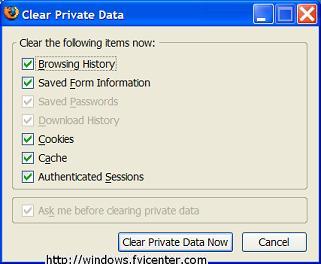
Now, I've never purchased software like this, I always just wrote batch files to delete temporary files and used browsers like Mozilla Firefox that has settings that will allow the automatic deletion of Private Data (see picture at right).
Moving on... CCleaner according to their website...is a freeware system optimization and privacy tool. It removes unused files from your system - allowing Windows to run faster and freeing up valuable hard disk space. It also cleans traces of your online activities such as your Internet history. But the best part is that it's fast (normally taking less than a second to run) and contains NO Spyware or Adware! :)
Sounds pretty perfect, huh?! Following is a list (from the CCleaner website) of what CCleaner will clean for you:
Internet Explorer
Temporary files, URL history, cookies, Autocomplete form history, index.dat.
Firefox
Temporary files, URL history, cookies, download history.
Opera
Temporary files, URL history, cookies.
Windows
Recycle Bin, Recent Documents, Temporary files and Log files.
Registry cleaner
Advanced features to remove unused and old entries, including File Extensions, ActiveX Controls, ClassIDs, ProgIDs, Uninstallers, Shared DLLs, Fonts, Help Files, Application Paths, Icons, Invalid Shortcuts and more... also comes with a comprehensive backup feature.
Third-party applications
Removes temp files and recent file lists (MRUs) from many apps including Media Player, eMule, Kazaa, Google Toolbar, Netscape, MS Office, Nero, Adobe Acrobat, WinRAR, WinAce, WinZip and many more...
100% Spyware FREE
This software does NOT contain any Spyware, Adware or Viruses.


I've never had CCleaner delete anything that my computer yelled at me about at any point later, so with that being said... You may download CCleaner by visiting their website at www.ccleaner.com. I would highly advise downloading it and using it. It's worth it!

Freeware Review: Defragmenting Applications
2007-11-28
So this will be the first of a series of software reviews. I'm going to start with freeware because really, what's better than free? Besides, I use almost nothing but freeware so I consider myself somewhat of an authority on the subject. Hope you'll agree...
I recently reformatted my computer and reinstalled a clean Windows XP. Once I installed all of the essentials I realized I hadn't installed a defragmenting program, and that my friends is unacceptable. Why? Read on.

First though... what is fragmentation?
Well, sometimes when you install a program or create a data file, the file ends up chopped up into chunks and stored in multiple locations on the disk. This is called fragmentation.
What makes this happen?
When you first install your operating system and programs on your hard disk, they are written to the disk, for the most part, in one contiguous block without any gaps. The exceptions are certain system files that must be stored in specific locations. Over time, as you create and then delete documents or uninstall programs, once-filled locations are left empty and you end up with files dotted all over the disk.
Now, when Windows is writing a file to the disk, it looks for a suitable piece of free space in which to store it. What happens, then, when you copy a 40MB database or audio file to the disk and the biggest slice of free space is only 30MB? Or say you modify an existing file, appending a whole bunch of data so the file now takes up more space on the disk. To accommodate the files, Windows writes the first part of the file in one section of the disk and then scouts around for other places to store the rest of the file. The end result is that a single file may be stored in several chunks scattered about the disk.
And, according to Wikipedia, defragmentation is a process that reduces the amount of fragmentation in file systems. It does this by physically reorganizing the contents of the disk to store the pieces of each file close together and contiguously. It also attempts to create larger regions of free space using compaction to impede the return of fragmentation. Some defragmenters also try to keep smaller files within a single directory together, as they are often accessed in sequence. According to a survey, 42% of PC users fail to defrag their system regularly, adversely affecting system performance.So hopefully after this post you'll not be part of that 42% because you'll have freeware ways to defrag your system.
I recently ran across an article called The Great Defrag Shootout which helped open my eyes to some free and payware defragmenting applications.
I'm going to jump right to the winner of that set of articles, or at least the freeware winner.
The winner was JkDefrag, or rather, it's GUI version. But it wasn't just JKDefrag that Mr. Edwards found did the trick. It was a suite of free defragmenting utilities that include JKDefrag 3.26, NTREGOPT, PageDefrag, JKDefrag GUI, and Contig.
I'll have to say that after year's of first using Windows built in defragmenter, and then converting to Diskeeper Professional edition, this suite of freeware applications is not only the best bang for your buck (especially since you spend nothing) but it's the best combination of utilities to help keep your computer running at optimal condition.
If you'd like to read more about the contenders of The Great Defrag Shootout and see how your defragmenter of choice ended up have a gander at Donn Edwards Insights and Rants blog.
As per my recommendation... I've been a faithful pay-for-defragmenter (;P) user for year's but I have jumped ship to the one-way boat to freeware land, and this suite of applications together, I've found, have kept my computer at tip-top shape and defragged computers who hadn't been defragged in over a year. I recommend downloading and trying this suite out. The best thing about JKDefrag is that you can set it to run while your screensaver is running, that way whenever your computer is idle it will defrag your computer.
You can download all of the applications in one easy to use setup program here. Be aware though that there is a new version of JKDefrag. Version 3.28, which Mr. Edwards has addressed here (but I haven't upgraded yet so you're on your own there).
Remember, you should definitely defrag your computer, why you ask? Read here.
Reinstall Windows and Outfit it with 100% Freeware
2007-11-07
Description: I recently clean installed Windows XP on my laptop, and this meant that I had to re-install all the essential software that I use. It also presented an opportunity to write a posting about how you can outfit your computer with all the essential (and non-essential) software you need using strictly 100% freeware and/or open source titles.This posting could have been titled any of the following:
- How to never use a paid program again (aside from Windows).
- 53 essential freeware programs that can take care of the majority of your computing needs.
Many of these apps I have never tried, but there is at least one that he left out... Firefox! I couldn't live without it.
Check the Awesomeness!
2007-11-01
First your phone went wireless, then your laptop, now finally, your camera! Never scrounge around for a USB cable again! Eye-fi is a magical orange SD memory card that will not only store 2GB worth of pictures, it'll upload them to your computer, and to Flickr, Facebook, Picasa (or 14 others) wirelessly, invisibly, automatically! This little guy looks like a normal 2GB memory card and works with nearly any camera that takes SD memory. There are no antennas, no protrusions, no subscription fees, and no cables. Here's how it works: You set up the card once with the included USB card reader (tell it which wireless network it should use, and type in the password if you have one), choose the photo sharing service of your choice (you have plenty of options), then slip the card in your camera. From then on, you never have to touch anything. Just take photos. Whenever your cameras near the wireless network you selected and idle, Eye-fi will upload all your photos (JPEGs only) to your online photo sharing service. Next time your computer's online, they'll download there, too! Yes, it is practically magic. It's amazing for anyone who loves photography, but also great for computer unsavvy parents and grandparents. Set up their photo sharing account, slip an Eye-fi in their camera, and your mom's finally your Flickr friend! Wow. All this for only $99. What will you ever do with all those cables now?
Aug. 29!!! :: Update
2007-10-24
So, I know I've been incredibly slack about posting... in fact, I considered canning the blog altogether, but then decided that I actually enjoy posting on here, regardless of readership.
According to Blogger, and far be it for me to say its wrong, I haven't posted since Aug. 29. I know, AUGUST 29!!! Well, in those couple of months.... life's happened. I know, you're surprised, but really... it has. I thought this first post back to blogging that I would mention a few things about what's been going on in life... and update if you will.
Hmmm.... since August 29 I have continued my adventures in Azeroth and abroad in the multiplayer online phenomenon World of Warcraft, though recently I haven't played nearly as much as in the past. I have been teaching 2 classes here at the institution in which I am employed, which has been incredibly exciting and stressful, generally speaking. My TV programs have begun to air again, and I've picked up a few new shows to watch. Currently I watch: Desperate Housewives, Brothers and Sisters, How I Met Your Mother, The Big Bang Theory, Heroes, Private Practice, and Grey's Anatomy (and on occasion Big Shots). I never really though I watched that much TV, and I suppose in the grand scheme of things I don't but...
I have found a tool that is quite wonderful for helping in my intense aversion for commercials and attempts to avoid them at all costs. This is actually why I don't just sit around watching television... I can't stand commercials, I feel it is a waste of my time and that the television companies (while I understand that commercials pay their bills) take advantage of me by requiring me to sit by the television waiting intently on the next few minutes of Heroes and having to suffer meantime by watching more and more commercials per volume than I had to watch last year. [My English isn't perfect and that was one hell of a run on sentence but plz don't correct me]
So back to the tool that helps me avoid the commercials...
If you know anything about downloading with Torrents then you'll love this application. If you don't know about torrents, let me know and I'll be glad to write something that will undoubtedly make you love them. Anyway, this application is called the Torrent Episode Downloader (TED for short). You enter the shows that you watch and it will automatically search Torrent databases for the requested show (every so often, and will even stop looking after it has downloaded that episode for the week if you set it up properly) and download it for you using your default Torrent application (I recommend µtorrent). You can read about and download TED by going here.
As for Azeroth, it'll just have to wait until I quit pwning n00bs in TF2. Besides, I'm waiting on the next patch where lvling 10-60 will be WAY faster and therefore I can level some new characters and possibly get a new perspective on the game. I'm tired of being stressed out about a video game, for once... can't we all just pwn?


